Comprehensive Guide to Client Dashboard
Welcome to the Kidillus Client Dashboard—your all-in-one command center. We have designed this interface to give you complete control over your creative projects, financial records, and public portfolio.
This guide covers every widget, chart, and tool available on your screen.
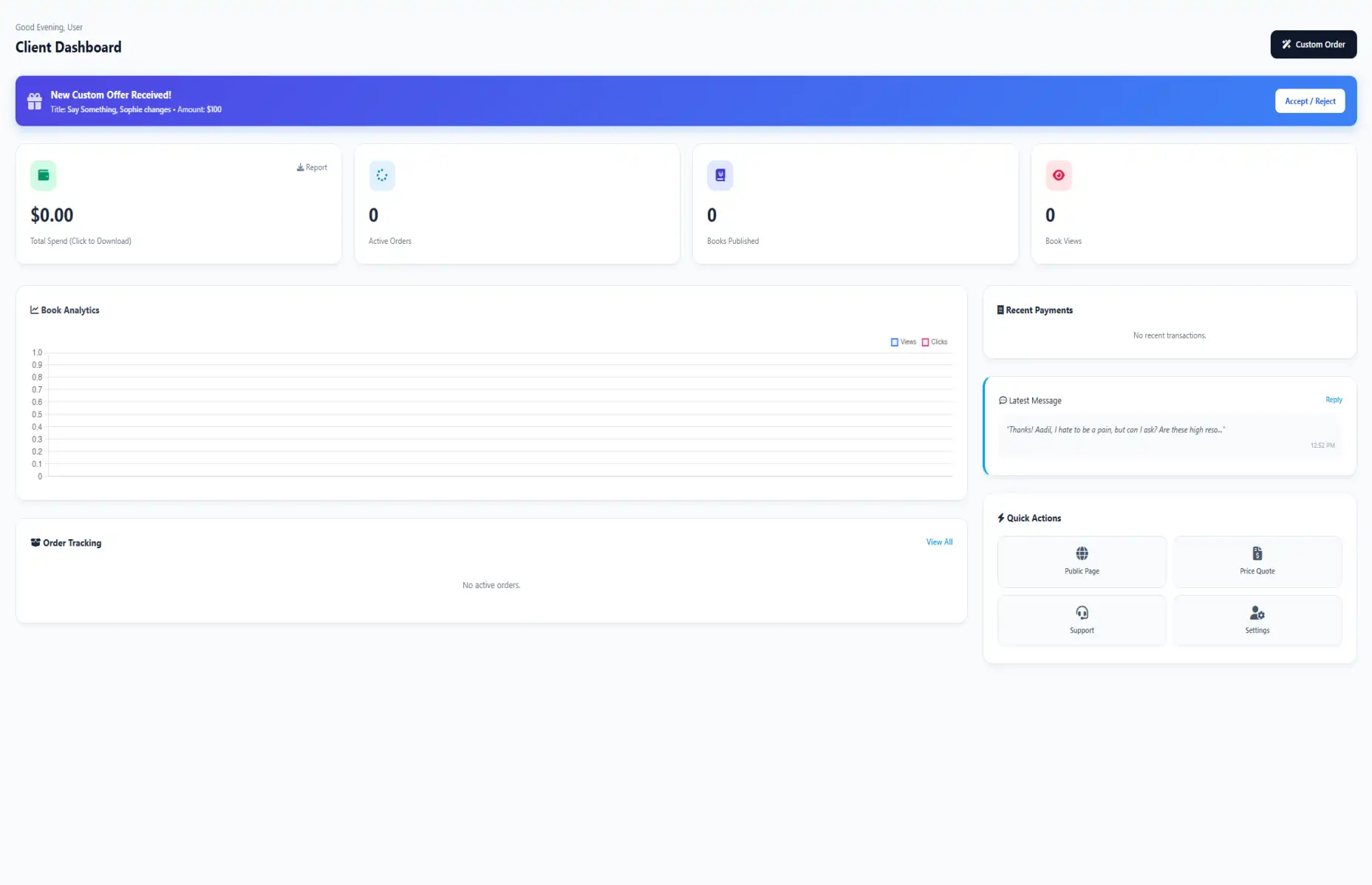
1. Header & Immediate Actions
At the very top of the dashboard, you will find your personalized greeting and the primary action area.
-
Personalized Greeting: The system recognizes the time of day (Morning, Afternoon, Evening) and greets you accordingly.
-
"Custom Order" Button: Located on the top right, this is your shortcut to start a new project. Clicking this takes you directly to the Price Quote wizard, bypassing the need to navigate through menus.
🔔 Offer Alerts: If a freelancer or admin sends you a Custom Offer, a blue notification bar will appear below the header. It displays the Offer Title and Amount. You can click "Accept / Reject" to handle it immediately.
2. Key Performance Indicators (The 4 Cards)
The top row consists of four interactive cards that provide a snapshot of your account's health.
A. Finance Wallet (Report Generation)
The first card displays your Total Spend on the platform.
- What it tracks: Every dollar spent on completed orders and PayPal transactions.
- Interactive Feature: This card is clickable! When you click on the Wallet Card, a "Download Finance Report" popup will appear.
- How to use: Select a From Date and To Date in the popup, then click "Generate PDF" to get a detailed statement for your taxes or records.
B. Active Orders
This shows the count of orders that are currently in progress (not yet completed or cancelled). It helps you quickly see if you have pending work waiting for your review.
C. Portfolio Stats (Books & Views)
The last two cards track your success as an author:
- Books Published: Total number of books linked to your profile.
- Book Views: The total number of times visitors have viewed your book details on the public page.
3. Visual Analytics & Insights
On the left side of the dashboard, you will find the Book Analytics Chart.
- The Graph: This interactive line chart plots data over time.
- Blue Line (Views): Represents how many people visited your book pages.
- Pink Line (Clicks): Represents engagement actions (like clicking to read more).
- Why this matters: This helps you understand which of your books are performing well and gaining popularity among the audience.
4. Real-Time Order Tracking
Gone are the days of guessing your order status. The "Order Tracking" section lists your 5 most recent orders with a visual progress bar.
Understanding the Progress Steps:
- ● Pending: You have placed the order, but work hasn't started.
- ● Requirements: The seller is waiting for your instructions/files.
- ● In Process: The work is currently being designed.
- ● Delivery: Files have been delivered for your review.
- ● Completed: The order is finished and closed.
5. Recent Activity & Communication
The right-hand column is dedicated to logs and quick access.
Recent Payments
A transparent log of your last 4 transactions. It shows the PayPal Transaction ID, the amount deducted, and the date. This ensures you can always cross-check your bank statement with Kidillus records.
Latest Message
Instead of going to the Inbox for every check, the dashboard pulls your latest received message. It shows a snippet of the text and the time it was sent. Click "Reply" to jump straight into the chat.
6. Quick Actions Menu
Located at the bottom right, this grid provides one-click access to essential tools:
-
Public Page:
This dynamically generates your unique profile link (e.g.,
kidillus.com/yourname). Share this link on social media to showcase your books.
-
Price Quote:
Need a new illustration? Use this to get an instant cost estimate.
-
Support:
Facing an issue? This opens the help center or contact form.
-
Settings:
Update your password, email, shipping address, or profile picture from here.
🚀 New Feature: Guided Tour
If you are new to Kidillus, don't worry about getting lost. The first time you visit the dashboard, an automated Interactive Tour will highlight each section and explain its function. Once you complete the tour, it won't disturb you again!
Chat & Communication
Our real-time messaging system keeps you connected with your illustrator or the admin team. All your project discussions happen in one secure place.
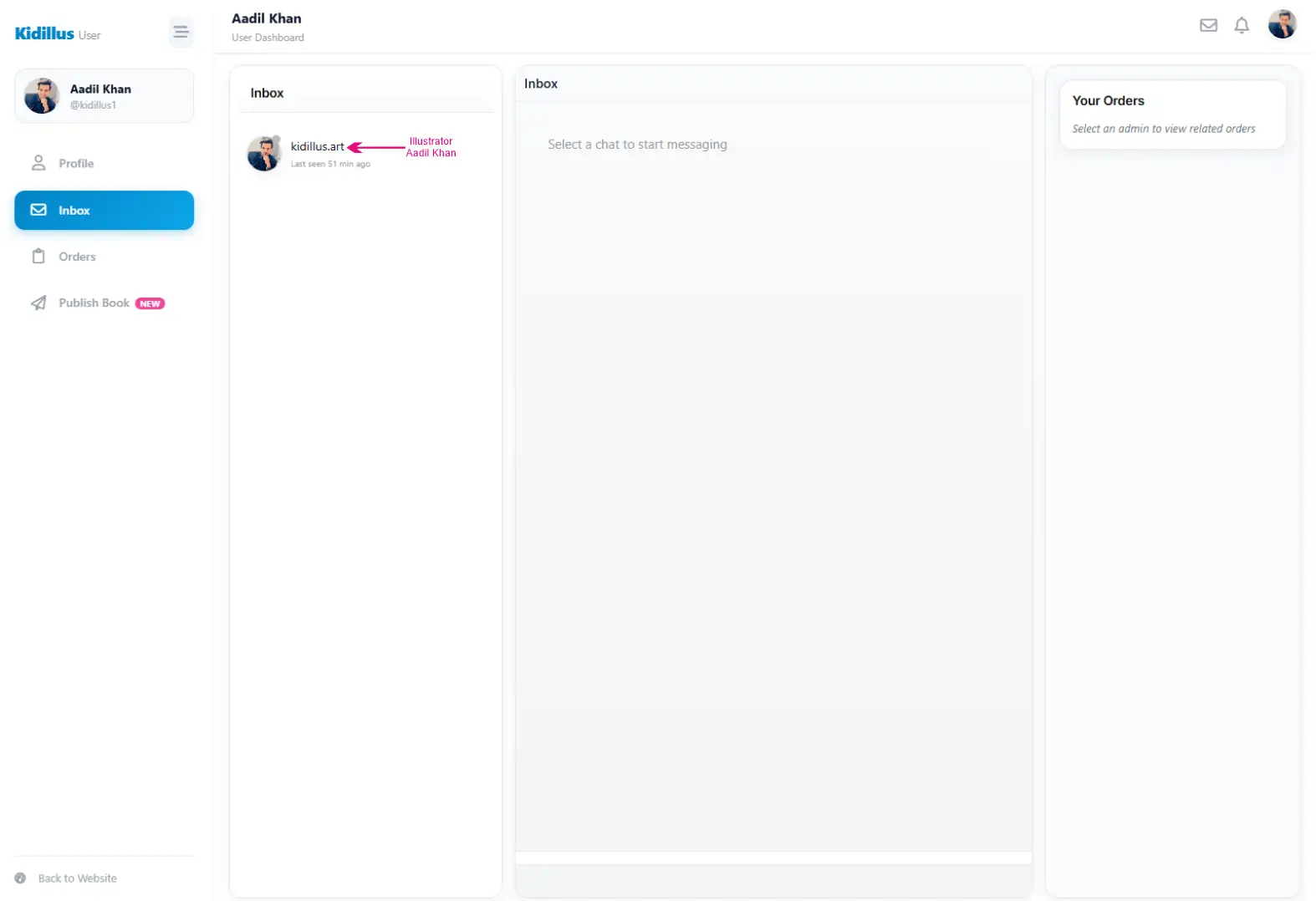
Interface Overview
- Inbox List (Left): View all your active conversations. You can also see the "Last seen" status of the person you are chatting with.
- Chat Window (Center): This is where the conversation happens. Messages are timestamped so you can track when updates were sent.
- Order Context (Right): The "Your Orders" panel on the right shows active order details related to the chat, so you don't have to switch tabs to check project status.
Messaging Tools
- Send Attachments: Click the Paperclip Icon (📎) near the text box to upload reference images, sketches, or documents.
- Sending Messages: Type your message and hit the Green Arrow Button to send instantly.
- Custom Offers: Receive and accept custom price quotes directly within the chat stream.
Security Tip: Always keep communication and payments inside Kidillus. This ensures you are protected by our Buyer Guarantee.
Children’s Book Illustration Services
We bring stories to life with professional illustration styles ranging from simple 2D art to cinematic 3D visuals. Choose the style that best fits your story's mood and target audience.
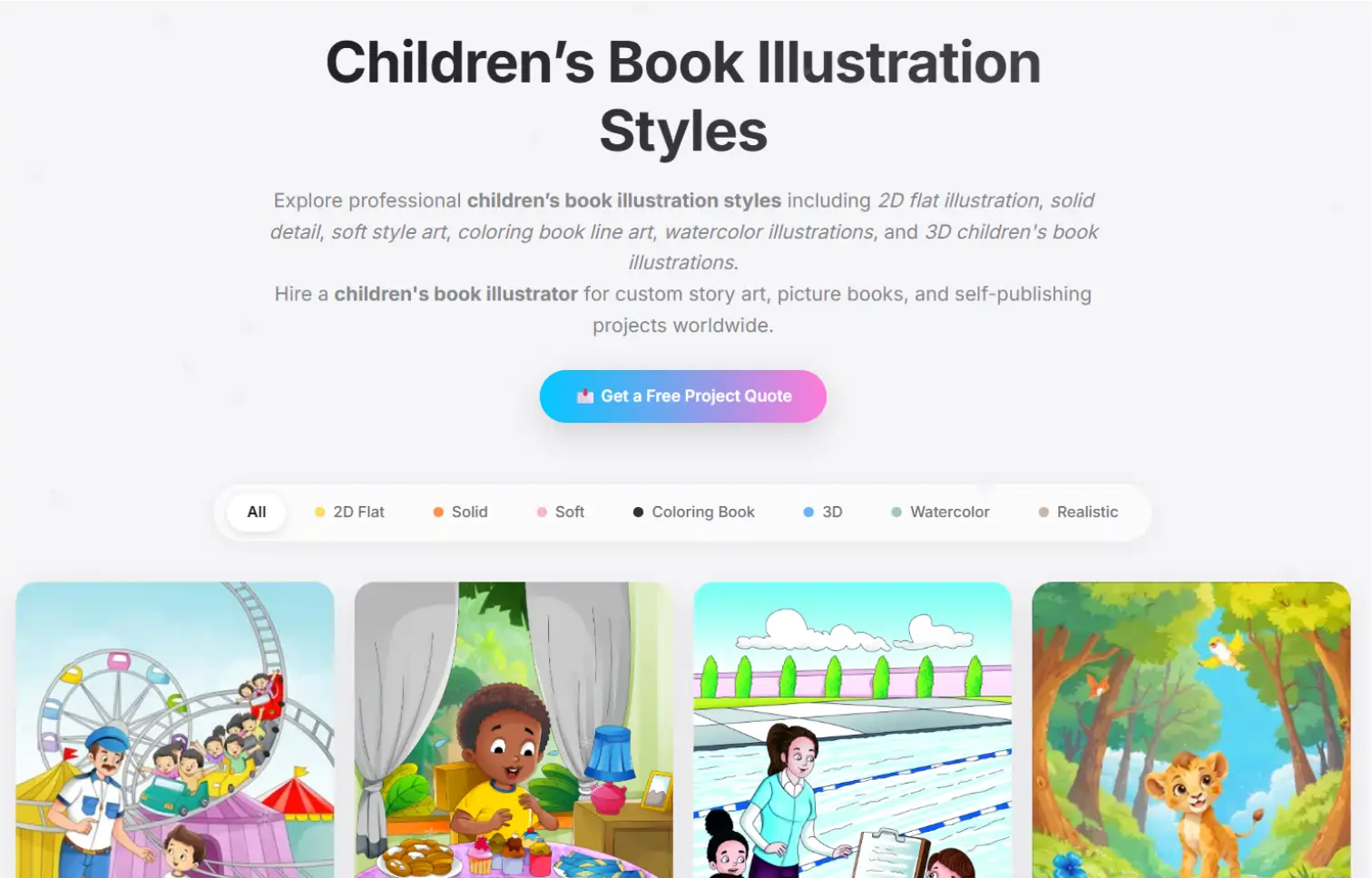
Select Your Illustration Style
Use the guide below to understand our style tiers and standard pricing per page:
2D Flat Color
$15 / page
Look: Clean, modern vector art with bright, solid colors and no shading.
Best For: Educational books, alphabet books, and early readers (Ages 0-5).
Solid Detail
$20 / page
Look: Adds depth to flat art using shadows and highlights. More textured than standard 2D.
Best For: Storybooks that need a bit more pop and character depth.
Soft Detail
$20 / page
Look: Gentle gradients, airbrushed finish, and dreamy lighting effects.
Best For: Bedtime stories, fairy tales, and emotional narratives.
Coloring Book (Line Art)
$10-15 / page
Look: High-quality black & white outlines (crisp line art).
Best For: Activity books, KDP coloring books, and workbooks.
Watercolor Style
$20 / page
Look: Artistic, hand-painted feel with brush textures and organic blending.
Best For: Classic storybooks, nature themes, and nostalgic tales.
3D / Pixar Style
$30 / page
Look: Cinematic lighting, high realism, and character modeling similar to animated movies.
Best For: Modern adventure stories and covers that need to stand out.
Realistic
$30 / page
Look: True-to-life proportions, intricate detailing, and complex backgrounds.
Best For: Historical fiction, biographies, or older children's books.
Not sure which style to pick? Provide your story summary, and we will recommend the style that sells best for your genre. Get a Free Consultation.
Enterprise Grade Printing
Kidillus isn't just digital. We print physical books with museum-quality standards and ship globally.

Vibrant CMYK
True-to-screen color accuracy (HP Indigo).
Heavyweight Paper
Premium paper that doesn't tear.
Binding Options
Hardcover (Casebound) & Softcover.
Shipping Regions: We currently ship to the US, UK, Canada, Australia, and 30+ other countries.
Get Printing Estimate
Children’s Book Illustrator Cost & Instant Quote
Find out exactly how much your project will cost. Prices typically range from $10 to $50 per page depending on the style.
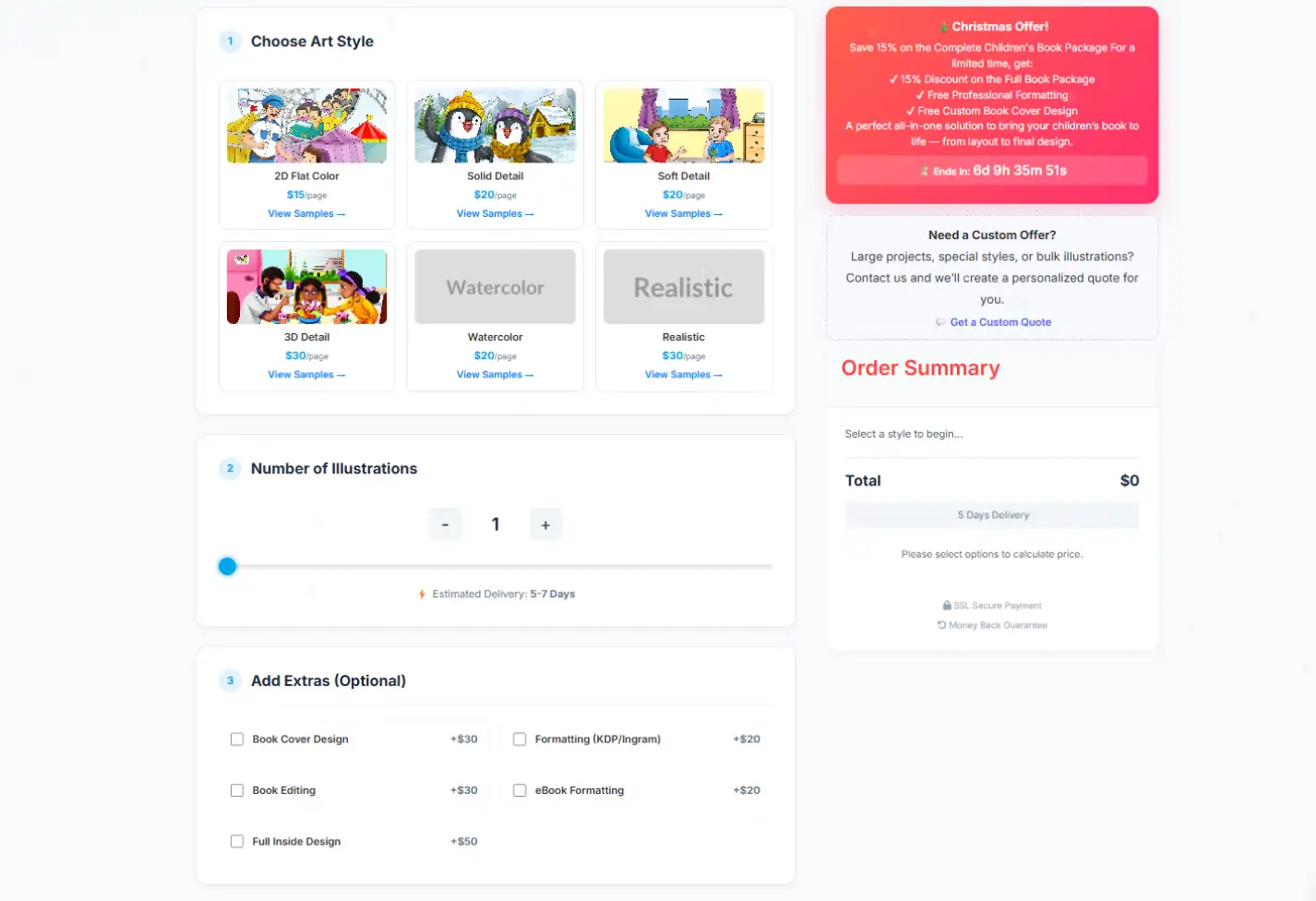
🎄 Christmas Offer! (Limited Time)
Save 15% on the "Complete Children's Book Package".
Includes: Free Professional Formatting & Free Custom Book Cover Design.
How to Calculate Your Price
Our instant calculator works in 3 simple steps:
-
Step 1: Choose Art Style:
Select from affordable options like 2D Flat ($15/page) to premium styles like 3D Detail ($30/page) or Realistic ($30/page).
-
Step 2: Set Page Count:
Use the slider to define the number of illustrations.
Estimated Delivery: Typically 5-7 Days for standard orders.
-
Step 3: Add Extras (Optional):
Customize your order with these professional add-ons:
- Book Cover Design: +$30
- Book Editing: +$30
- Formatting (KDP/Ingram): +$20
- eBook Formatting: +$20
- Full Inside Design: +$50
Trust & Security: All orders are covered by our Money Back Guarantee and processed via SSL Secure Payment.
Managing Your Orders
Track the progress of your book from start to finish via the "My Orders" tab.

Order Stages
- 1. Requirements Submitted: You fill out the form (Size, Pages, Style Notes, Story Script).
- 2. In Progress: The illustrator starts sketching. You will receive updates in chat.
- 3. Revision Requests: Review the work and ask for changes if needed.
- 4. Completed: Once you are happy, the order is marked complete and files are yours!
Publish Your Book & Connect with Readers
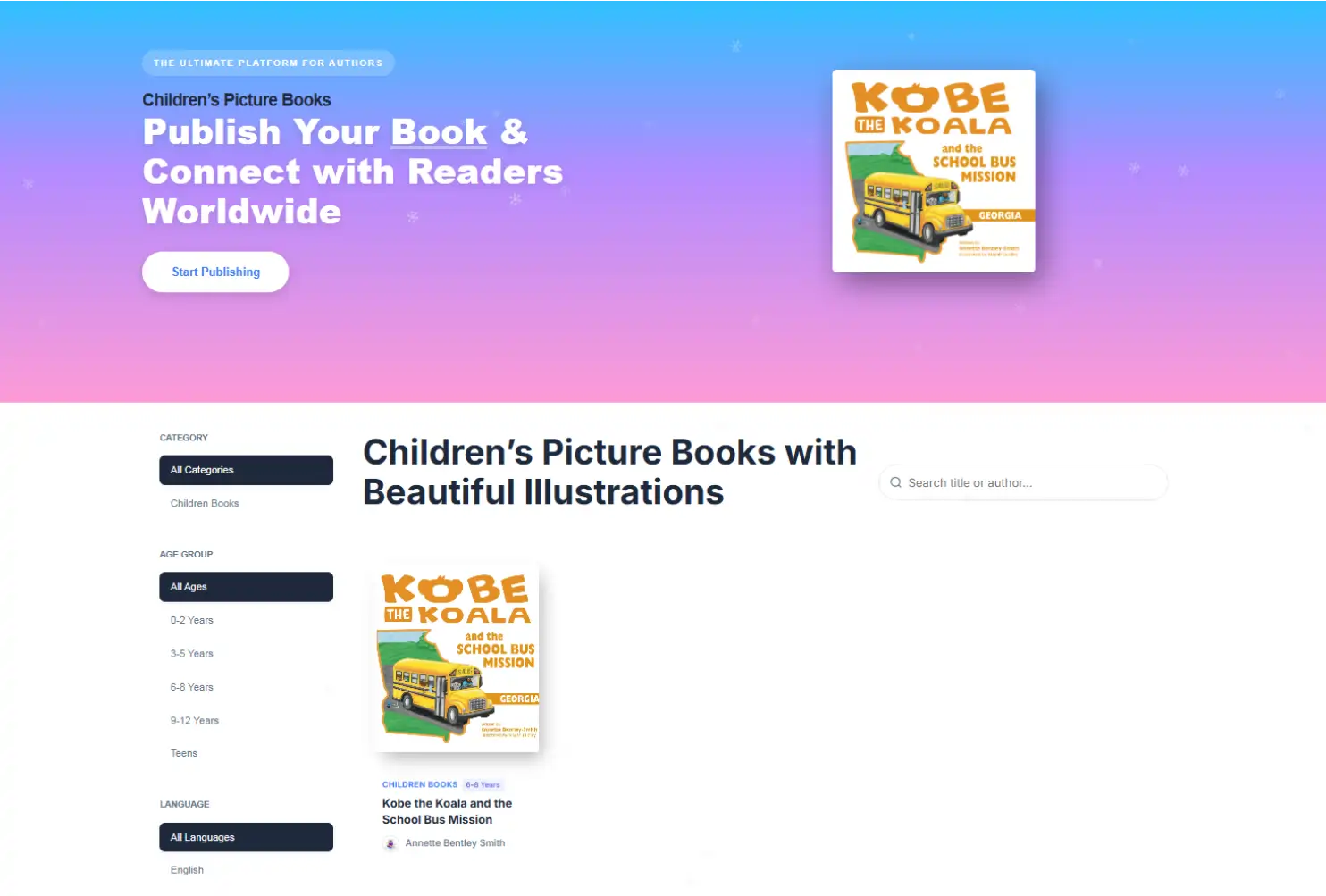
Once your book is ready, publish it on the Kidillus Library to reach readers worldwide. Manage your listing directly from your Dashboard.
1. Library Visibility & Discovery
Your book will be listed in our public directory where readers can discover it using smart filters:
- Categories & Age Groups: Readers can filter books by specific ages (e.g., 6-8 Years, 0-2 Years) to find the perfect match.
- Language Support: Whether your book is in English, Spanish, or Hindi, users can filter by language.
- Tags: Specific tags like "Children Books" help your book appear in relevant searches.
2. Your Book Page Features
Every published book gets a dedicated landing page designed to convert visitors into buyers:
- "Look Inside" Preview: Upload sample pages so readers can peek inside your book before buying (just like Amazon).
- "Get This Book" Button: This button links directly to your sales page (Amazon, IngramSpark, or your website), so you keep 100% of the sales royalties.
- Reviews & Ratings: Readers can leave star ratings and written reviews to boost your book's credibility.
3. Author Branding
Publishing a book automatically creates your professional Author Profile:
- Verified Badge: Establish trust with a "Verified" tick mark next to your name.
- Bio & Portfolio: Showcase your biography, location, and all your published books in one place.
- Social Sharing: Visitors can easily share your book link via the "Share Link" button.
Pro Tip: Fill out your "About the Author" section completely to build a connection with your readers.
Please
Login to view your support tickets.